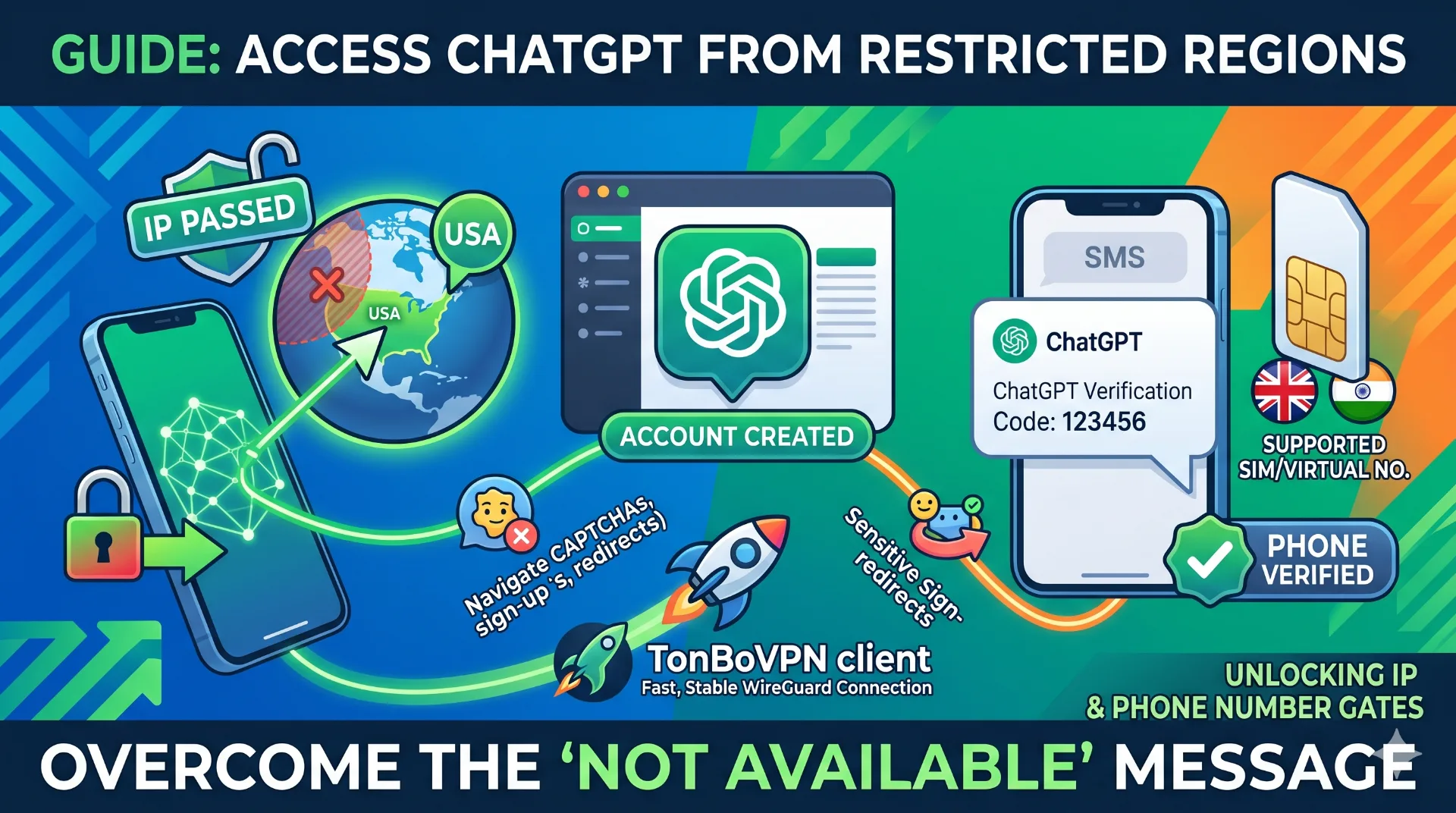
Open the OpenAI sign-up page from the wrong place and you get one flat line of text: "ChatGPT is not available in your country." No form, no retry button, nothing. Most people assume one workaround clears it. It doesn't, because OpenAI is actually running two checks, and they're independent of each other.
The first is your IP address. The second is the country your phone number comes from. Pass one and fail the other and you'll get halfway through registration before the door slams. So before you start hunting for servers and numbers, it helps to know exactly which gate is stopping you.
Why your friend has an account and you don't
The block doesn't hit everyone the same way, which confuses people. A common situation: someone moved abroad to a region OpenAI hasn't switched on. Their old account, made before the move, still logs in fine from the new apartment. A flatmate on the exact same Wi-Fi tries to register fresh and gets bounced at step one.
Same network, opposite result. The difference is timing, not the connection. One account was created from a supported location and the other wasn't. For the person starting from scratch, the answer is to register through a supported-country IP first, then sign in normally from then on.
Then there's the freelancer case, which is more annoying. A writer or developer connects to a clean US server, the page loads perfectly, the form appears, and then SMS verification throws an error anyway. Their local carrier number sits on OpenAI's blocked list. IP fine, phone not fine. This single mismatch is the most common reason a sign-up dies partway through, and it catches people who think the hard part is already behind them.
What OpenAI actually checks at sign-up
When the registration page loads, OpenAI does a geo-IP lookup on your public address and matches it against its list of supported regions. Resolve to an unsupported country and you never even see the form. That's gate one.
Gate two arrives later, at phone verification. Here the country code and the carrier type of your number get judged on their own terms. Because the two checks don't talk to each other, a US IP paired with a local SIM from a blocked country still fails. Treat them as one problem and you'll keep getting stuck. Treat them as two, and each has a clean solution.
Picking a server that won't time out
For the IP gate, connect somewhere clearly supported. The US is what most people reach for, but the UK, Canada, Germany, and most of the EU all work. Country matters less than you'd think; connection quality matters more.
The sign-up flow throws a CAPTCHA at you and bounces through several redirects. A laggy link makes those steps loop or time out, and you end up restarting from the top. A connection running WireGuard or a similar modern protocol keeps latency low enough that the CAPTCHA solves, the confirmation email arrives, and the dashboard opens without a fight. This is the part where a stable client like TonBoVPN actually matters, because the redirect chain is unforgiving of dropped packets.
The phone number is where most attempts die
OpenAI wants a number that originates in a supported country and isn't sitting in a flagged virtual range. Real mobile numbers from supported countries clear this most reliably.
If your own number is blocked, a virtual number from a supported country is the standard fallback. Numbers from India and Indonesia get reported as cheap and dependable, often in the $0.10 to $0.20 range; Brazil, the Philippines, and the UK make solid backups. Go with a reputable SMS provider. OpenAI has tightened its filters against heavily abused VoIP ranges over the years, so a free throwaway number from some public site gets rejected far more often than not.
After you're in, do you still need the VPN?
Usually less than you'd expect. Registration is the hard gate; daily access tends to be softer. Plenty of people in restricted regions sign in afterward on their normal connection and never think about it again.
It does vary by region, though. Some country IP ranges are blocked only at sign-up, while others stay restricted for ongoing use too. If you're in the second group, you just reconnect to a supported server before opening ChatGPT. Either way, having a fast connection on standby beats wrestling a slow free proxy every single session.
How different connection types hold up
| Method | Sign-up success | Speed during CAPTCHA and redirects | Stability for daily use | Privacy |
|---|---|---|---|---|
| TonBoVPN client (modern protocol) | High | Low latency, loads first try | Reconnects cleanly | Encrypted tunnel |
| Free public proxy | Low, often blocked | Slow, frequent timeouts | Drops often | May log traffic |
| Free VPN tier | Hit or miss, crowded servers | Variable, queue lag | Bandwidth capped | Ad-funded, mixed |
| Mainstream paid VPN | High | Generally fast | Stable | Encrypted tunnel |
| Browser-only proxy extension | Low for sign-up | Inconsistent | Weak | Limited scope |
The pattern in that table is simple enough: anything crowded, free, or browser-scoped tends to choke on the CAPTCHA and redirect sequence, which is exactly the moment you can't afford a dropped connection.
Questions people actually ask
My IP showed as US, so why did sign-up still fail?
The phone step, almost every time. OpenAI checks your IP and your number's country separately. A US server clears the first gate, but a local or flagged virtual number fails the second one. Use a real or reputable virtual number from a supported country and it goes through.
Do I have to keep the VPN on after registering?
In a lot of restricted regions, no. The sign-up check is the strict one, and daily logins frequently work on your ordinary connection afterward. If your region happens to block ongoing access as well, just reconnect to a supported-country server before you open ChatGPT.
Can I get away with a free number from an online SMS site?
Occasionally, but don't count on it. Those numbers are shared by thousands of people, get flagged constantly, and usually bounce. A small paid virtual number from a decent provider has a much higher hit rate and costs a fraction of a dollar.
Is my account at risk if I sign up this way?
Using the service from an unsupported country can carry some risk under OpenAI's terms, so read them yourself rather than taking my word for it. To keep friction down: register through a stable connection, clear your cookies before signing in, and use a private browser window so nothing stale confuses the geo-detection.
The short version
Two gates, handled calmly. Get a supported-country IP so the page loads, and a supported-country number so the SMS code arrives. Clear both and you're in, and from there day-to-day use is almost always easier than that first sign-up was.
If you want the whole sequence to load fast and finish on the first attempt, the TonBoVPN client connected to a US or UK server handles the latency-sensitive parts well. Walk through the steps above and the wall that looked permanent turns into about five minutes of setup.