Choosing a TonBoVPN Plan in 2026: Start With the Free 1GB, Then Pick a Traffic Pack
Most people comparing paid network tools in 2026 are really asking one question: how much will I spend before the connection does what I need? For TonBoVPN the answer now starts at zero. Every new account receives 1GB of traffic on registration. It is a one-time gift, no bank card is required, and every node is open for testing. When that 1GB is used up, you buy a traffic pack by the week, month, quarter or year. Dedicated nodes and dedicated IPs are a separate purchase for people who need an exit address that belongs to them alone.
This guide follows the order in which most readers actually decide: test with the free traffic, size a pack, work out whether a dedicated IP is relevant, and then handle payment, balance and referral rewards. Prices below follow the official site as of October 2026. Always confirm the current numbers on the site before you pay.
Step One: Use the Free 1GB to Test What You Actually Do
1GB is roughly 1,000MB. Because it is a one-time gift and not an allowance that refreshes, treat it as a trial budget. The goal is not to squeeze as much use out of it as possible. The goal is to learn, with your own habits, which pack you will need once it is gone.
What should you test with the free traffic?
Test the tasks you repeat every week, on the devices you really use, and write down how much traffic each one consumes. A short, structured trial gives you a far better estimate than guessing.
- Open the AI assistants, collaboration tools and sites you rely on and confirm that they load normally through the node you picked.
- Try two or three different nodes at different times of day. The best node depends on your location and your local network provider, so one test at one hour proves little.
- Run one realistic work session, such as a long chat, a document sync or a coding-assistant task, and note how much of the 1GB it used.
- Try one heavier activity, such as video streaming or a large download, to see how quickly that kind of use drains the allowance.
- Record the results in a small note so that you can scale them up to a week or a month.
How do you turn the trial into a traffic estimate?
Use plain arithmetic. Take the traffic one typical working session consumed, multiply it by the number of sessions you expect in a week, and then by four for a month. For illustration only: if your own test showed that a typical working day used 2GB, a week would be about 14GB and a month about 60GB. Those numbers are an example of the method, not a measurement, so replace them with your own. Add a margin of around a third for the days that go beyond the routine, because running out in the middle of a project is more annoying than carrying a little unused traffic.
The Four Traffic Packs Compared
After the free 1GB is used, you choose a pack by billing period. The longer the period, the lower the price per GB. A pack is valid for the period you select, and any traffic that has not been used when the period ends expires. Payment can be made by Visa or MasterCard card, or in USDT, and the traffic is credited once payment succeeds.
| Pack | Traffic | Price (Oct 2026 official) | Approx. price per GB | Best fit |
| Weekly | 100GB | $2.99 | about $0.030 | Trips, short projects, a first paid trial |
| Monthly | 300GB | $4.99 | about $0.017 | Steady personal use |
| Quarterly | 900GB | $11.99 | about $0.013 | Ongoing use with a seasonal rhythm |
| Annual | 4000GB | $43.99 | about $0.011 | Long-term use with a clear yearly estimate |
The per-GB column is simple division of the listed price by the listed traffic. It is there to compare the packs with each other, not as a promise about any particular amount of use.
When does the weekly pack make sense?
The weekly pack has the highest cost per GB, but it also carries the smallest commitment. It suits a business trip, a one-off project or a first purchase when you want to see how a paid pack feels before committing to a longer period. Because the traffic expires at the end of the week, it works best when you know the work is concentrated in that window.
When does the monthly pack make sense?
The monthly pack is the natural default for steady personal use. At 300GB for $4.99 it is already much cheaper per GB than the weekly pack, and a month is a period most people can estimate with reasonable confidence from their trial notes.
When do the quarterly and annual packs make sense?
These two reward predictability. The quarterly pack is 900GB for $11.99 and the annual pack is 4000GB for $43.99. The lower per-GB price only becomes a saving if you actually use the traffic within the period, because whatever is left when the period ends is lost. If your usage is steady and your trial notes point comfortably into this range, the longer period is the cheaper way to buy. If your usage is irregular, a shorter pack that you renew when needed may cost less in practice.
A quick way to choose
- If you need access for only a few days or one project, start with the weekly pack.
- If your estimate is a few dozen GB a month with a regular pattern, the monthly pack is the simplest fit.
- If you have used a monthly pack for a few cycles and your usage stayed stable, move up to the quarterly pack.
- If you have a clear yearly estimate and do not expect your habits to change, the annual pack gives the lowest price per GB.
Dedicated Node and Dedicated IP: A Separate Purchase
A dedicated node or dedicated IP is sold on its own, alongside the traffic packs. It is not a bonus attached to any pack, and buying a longer pack does not give you one. The idea is straightforward: instead of sharing an exit address with other users, you get a node or an IP that is assigned to you. I do not list a price or technical specification here, because those details can change. Check the official site or ask support for the current availability, price and terms before deciding.
Who should consider a dedicated IP?
A dedicated IP is worth considering when the stability of your exit address matters more than the choice of a shared node. Typical cases are an account you keep for a long time and do not want to see from constantly changing addresses, a service that only accepts connections from an address you have registered in advance, or a small team that wants one predictable exit address for shared tools. It is not needed for casual browsing or occasional use of AI assistants, where the shared nodes that come with a traffic pack are enough.
What does a dedicated IP not change?
A dedicated IP does not remove the need to use online services in line with their own rules, and it does not guarantee any outcome with a third-party platform. It is a networking resource, not a workaround for platform policies. Check the purchase page for how traffic is accounted for on dedicated resources, and keep in mind that dedicated nodes and dedicated IPs are not eligible for refunds.
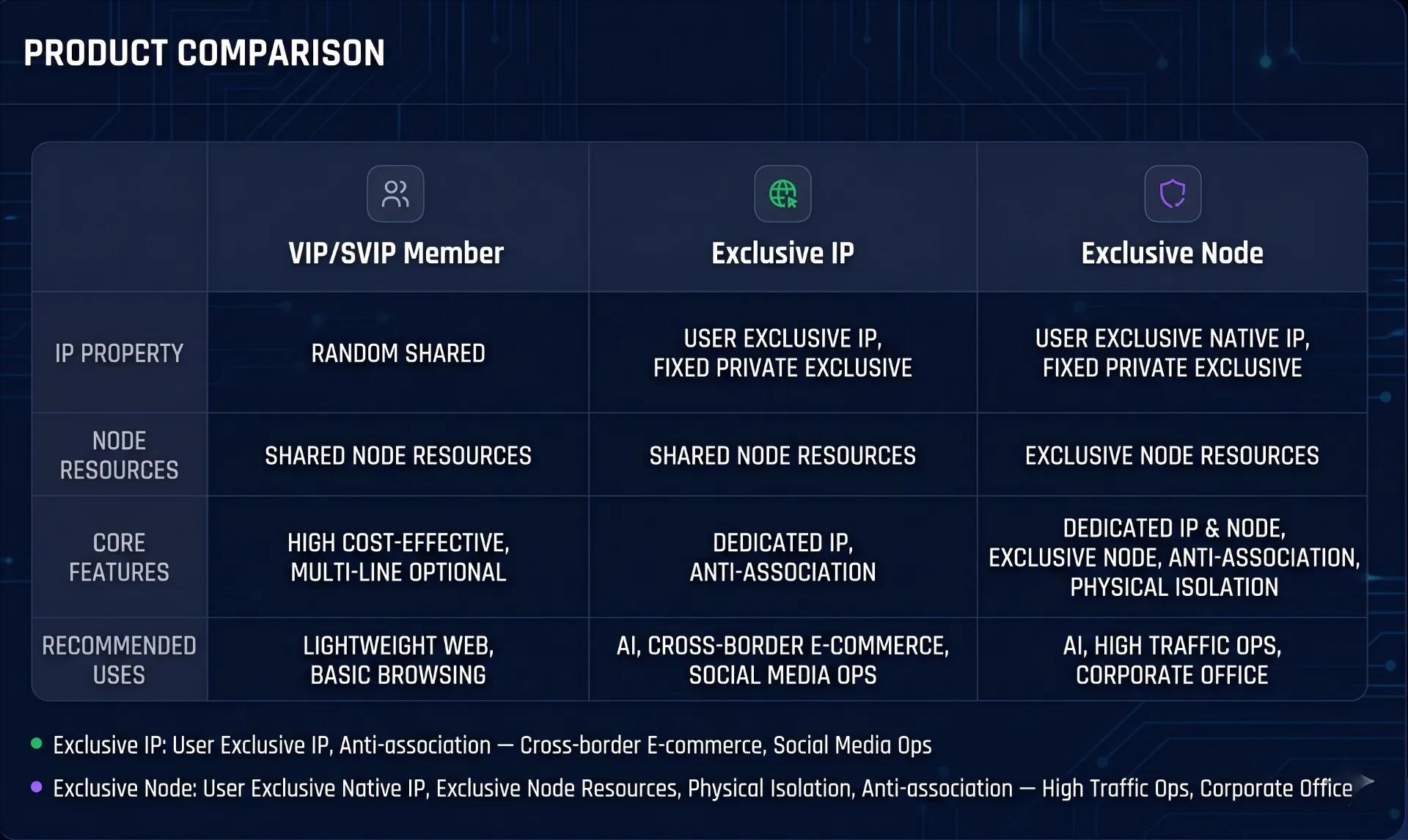
Free Shared Tools, Traffic Packs and Dedicated IP Side by Side
The table below compares the three approaches on the points that tend to matter when you choose. It is a qualitative comparison and deliberately avoids performance figures, since real results depend on your location, your device and the time of day.
| Point of comparison | Free shared tools | TonBoVPN traffic pack | TonBoVPN dedicated IP |
| Cost model | Free, but limits and conditions vary | Fixed price per period, listed on the site | Separate purchase, terms on the site |
| Exit address | Shared with many users | Shared nodes | Assigned to you |
| Traffic allowance | Often unclear | Stated per pack and period | Check the purchase page |
| Payment | Usually none | Visa, MasterCard or USDT | Per the purchase page |
| Refunds | Not applicable | Per the terms of service and support | Not refundable |
Payment, Balance and Referral Rewards
Traffic packs can be paid for by Visa or MasterCard card, or in USDT. Once payment succeeds, the traffic is credited to your account. For refunds, the rule is simple: refunds follow the official terms of service and the answer from support, and dedicated nodes and dedicated IPs are not refundable. Read the terms before you buy a longer pack.
How does the invitation reward work?
When a friend registers through your invitation, both of you receive $1 of account balance. When that friend buys a traffic pack for the first time, you also receive a commission of 20% of that order amount. The commission applies to the first purchase only, so renewals and later purchases do not earn more. Balance can only be spent on traffic packs inside the site and cannot be withdrawn.
How can balance help with the first pack?
Balance is applied toward buying a traffic pack, so a $1 invitation reward reduces what you pay. It is a small amount, but it lowers the cost of a first weekly pack and is worth using before you pay by card.
Conclusion: Test First, Size the Pack, Then Decide on a Dedicated IP
The sequence is short. Use the free 1GB to measure your own usage, turn that into a weekly or monthly estimate, and choose the pack whose period you can actually fill. Consider a dedicated IP only if a stable exit address of your own matters for your work. Compare prices at the official site, because the numbers in this guide are those of October 2026.
Visit the official TonBoVPN website (tonbovpn.com) to register, claim the free 1GB and check the current traffic pack prices.